Link Aggregation
The Link Aggregation feature helps to connect two or more physical links between two network devices without forming loops. Link Aggregation can be used between switches, servers and routers.
Link Aggregation provides the following advantages:
-
Increased bandwidth: Users can connect more than one physical link between devices to increase the link bandwidth.
-
Incremental bandwidth: Users can start aggregation with a fewer number of ports and then increase the number of ports in aggregation incrementally based on bandwidth requirements.
-
Redundancy: When one of the physical links fails, traffic is distributed over the other remaining links in the aggregation.

Figure 4. Link Aggregation
Note: The term "port channel" is used synonymously with aggregated links.
Creating Port Channels
Port channel creation involves two steps: the first step is creating the port channel interfaces and the second step is adding member ports to the port channel interfaces.
Creating Port Channel Interfaces
Follow the steps below to create port channel interfaces in SONiC:
|
Step |
Command |
Description |
|---|---|---|
|
1 |
config portchannel add <portchannel_name> |
Create a port channel interface.
|
|
2 |
show interfaces portchannel |
Display the configured port channel interfaces. |
|
3 |
sudo config save –y |
Optional: Save the current configuration to be part of the startup configuration. |
The following example shows how to create a port channel interface.
|
admin@sonic: ~$ sudo config portchannel add PortChannel0001 |
|||
|
admin@sonic: ~$ show interfaces portchannel |
|||
|
Flags: |
A - active, I - inactive, Up - up, Dw - Down, N/A - not available, |
||
|
|
S - selected, D - deselected, * - not synced |
||
|
No. |
Team Dev |
Protocol |
Ports |
|
- - - |
- - - |
- - - |
- - - |
|
0001 |
PortChannel0001 |
LACP(A)(Dw) |
|
-
It is recommended to use port channel names in the format "PortChannelxxxx", replacing "xxxx" with a number of up to four digits (such as "PortChannel0001").
-
If users specify any other name like "pc10", the command will succeed, but such names are not supported as those names are not printed properly in the show interface portchannel command. Therefore, nonstandard channel names are not recommended.
Adding Member Ports to Port Channels
Follow the steps below to add a member port to an existing port channel. A maximum of eight members shall be added to a port channel.
|
Step |
Command |
Description |
|---|---|---|
|
1 |
config portchannel member add <portchannel_name> <member_portname> |
Add a member port to an existing port channel.
|
|
2 |
show interfaces portchannel |
Display the configured port channel information. |
|
3 |
sudo config save –y |
Optional: Save the current configuration to be part of the startup configuration. |
Note: Only ports of the same speed can be added to port channel interfaces. IP addresses must be removed before adding the port to the port channel.
The following example shows how to add a member port in a port channel:
-
Add an interface, Ethernet48, as a member port in PortChannel0001:
admin@sonic: ~$ sudo config portchannel member add PortChannel0001 Ethernet48
-
When there is no LACP in a peer:
admin@sonic: ~$ show interface portchannel
Flags:
A - active, I - inactive, Up - up, Dw - Down, N/A - not available,
S - selected, D - deselected, * - not synced
No.
Team Dev
Protocol
Ports
- - -
- - -
- - -
- - -
0001
PortChannel0001
LACP(A)(Dw)
Ethernet48(D)
admin@sonic: ~$ sudo config portchannel member add PortChannel0001 Ethernet52
-
When there is LACP in a peer:
admin@sonic: ~$ show interface portchannel
Flags:
A - active, I - inactive, Up - up, Dw - Down, N/A - not available,
S - selected, D - deselected, * - not synced
No.
Team Dev
Protocol
Ports
- - -
- - -
- - -
- - -
0001
PortChannel0001
LACP(A)(Dw)
Ethernet52(D) Ethernet48(D)
Removing Member Ports from a Port Channel
Follow the steps below to remove a member port from a port channel.
|
Step |
Command |
Description |
|---|---|---|
|
1 |
config portchannel member del <portchannel_name> <member_portname> |
Remove a member port from a port channel.
|
|
2 |
show interfaces portchannel |
Display the configured port channel information. |
|
3 |
sudo config save –y |
Optional: Save the current configuration to be part of the startup configuration. |
The following examples show how to delete a member port from a port channel.
|
admin@sonic: ~$ sudo config portchannel member del PortChannel0001 Ethernet48 |
|||
|
admin@sonic: ~$ sudo config portchannel member del PortChannel0001 Ethernet52 |
|||
|
admin@sonic: ~$ show interface portchannel |
|||
|
Flags: |
A - active, I - inactive, Up - up, Dw - Down, N/A - not available, |
||
|
|
S - selected, D - deselected, * - not synced |
||
|
No. |
Team Dev |
Protocol |
Ports |
|
- - - |
- - - |
- - - |
- - - |
|
0001 |
PortChannel0001 |
LACP(A)(Dw) |
|
Removing Port Channels
Follow the steps below to remove port channels from SONiC.
|
Step |
Command |
Description |
|---|---|---|
|
1 |
config portchannel member del <portchannel_name> <member_portname> |
Remove a member port from a port channel.
|
|
2 |
show interfaces portchannel |
Display the configured port channel information. |
|
3 |
sudo config save –y |
Optional: Save the current configuration to be part of the startup configuration. |
The following example shows how to remove a port channel.
|
admin@sonic: ~$ sudo config portchannel del PortChannel0001 |
|||
|
admin@sonic: ~$ show interface portchannel |
|||
|
Flags: |
A - active, I - inactive, Up - up, Dw - Down, N/A - not available, |
||
|
|
S - selected, D - deselected, * - not synced |
||
|
No. |
Team Dev |
Protocol |
Ports |
|
- - - |
- - - |
- - - |
- - - |
Note: The port channel cannot be deleted when there is a member in it. Remove the member ports before deleting a port channel.
Link Aggregation Configuration Example
Configure the SONiC switch as shown in the figure below.
-
Aggregate ports Ethernet48 and Ethernet49 in port channel PortChannel0004. Also configure this aggregation as a tagged interface with VLAN 20.
-
Aggregate ports Ethernet50 and Ethernet51 in port channel PortChannel0100. Configure this aggregation as an untagged port on VLAN 10.
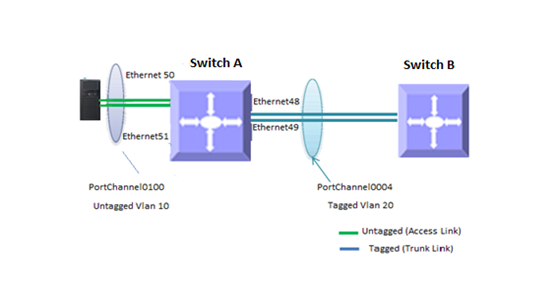
Figure 5. Link Aggregation
-
Create VLANs 10 and 20 first.
admin@sonic: ~$ sudo config vlan add 10
admin@sonic: ~$ sudo config vlan add 20
-
Create port channel PortChannel0004, adding Ethernet48 and Ethernet49 as members.
admin@sonic: ~$ sudo config portchannel add PortChannel0004
admin@sonic: ~$ sudo config portchannel member add PortChannel0004 Ethernet48
admin@sonic: ~$ sudo config portchannel member add PortChannel0004 Ethernet49
-
Add port channel PortChannel0100 as a tagged member for VLAN 20.
admin@sonic: ~$ sudo config vlan member add 20 PortChannel0004
-
Create port channel PortChannel0100, adding Ethernet50 an Ethernet51 as members.
admin@sonic: ~$ sudo config portchannel add PortChannel0100
admin@sonic: ~$ sudo config portchannel member add PortChannel0100 Ethernet50
admin@sonic: ~$ sudo config portchannel member add PortChannel0100 Ethernet51
-
Add port channel PortChannel0004 as an untagged member for VLAN 10.
admin@sonic: ~$ sudo config vlan member add -u 10 PortChannel0100
admin@sonic: ~$ sudo interface portchannel
Flags:
A - active, I - inactive, Up - up, Dw - Down, N/A - not available, S - selected, D - deselected, * - not synced
No.
Team Dev
Protocol
Ports
- - -
- - -
- - -
- - -
0001
PortChannel0001
LACP(A)(Dw)
Ethernet48(D) Ethernet49(D)
0004
PortChannel0004
LACP(A)(Dw)
Ethernet50(D) Ethernet51(D)
0100
PortChannel0100
LACP(A)(Dw)
admin@sonic: ~$ show vlan config
Name
VID
Member
Mode
- - -
- - -
- - -
- - -
Vlan10
10
Ethernet1
untagged
Vlan10
10
Ethernet2
untagged
Vlan10
10
Ethernet3
untagged
Vlan10
10
Ethernet5
tagged
Vlan10
10
Ethernet6
tagged
Vlan10
10
Ethernet7
tagged
Vlan10
10
PortChannel0100
untagged
Vlan20
20
Ethernet4
tagged
Vlan20
20
Ethernet5
tagged
Vlan20
20
Ethernet6
tagged
Vlan20
20
Ethernet7
tagged
Vlan20
20
PortChannel0004
tagged
Vlan30
30
Ethernet4
tagged
Vlan30
30
Ethernet5
tagged
Vlan30
30
Ethernet6
tagged
Vlan30
30
Ethernet7
tagged
Vlan100
100
Vlan200
200
admin@sonic: ~$ show vlan brief
- - -
- - -
- - -
- - -
- - -
- - -
VLAN ID
IP Address
Ports
Port Tagging
Proxy ARP
DHCP Helper Address
- - -
- - -
- - -
- - -
- - -
- - -
10
Ethernet1
untagged
disabled
Ethernet2
untagged
Ethernet3
untagged
Ethernet5
tagged
Ethernet6
tagged
Ethernet7
tagged
PortChannel0100
untagged
- - -
- - -
- - -
- - -
- - -
- - -
20
Ethernet4
tagged
disabled
Ethernet5
tagged
Ethernet6
tagged
Ethernet7
tagged
PortChannel0004
tagged
- - -
- - -
- - -
- - -
- - -
- - -
30
Ethernet4
tagged
disabled
Ethernet5
tagged
Ethernet6
tagged
Ethernet7
tagged
- - -
- - -
- - -
- - -
- - -
- - -
100
disabled
- - -
- - -
- - -
- - -
- - -
- - -
200
disabled
- - -
- - -
- - -
- - -
- - -
- - -