Front Control Panel
JF1 on the C9Z890-MW/C9B860-MW/C9Q870-M motherboard contains header pins for various buttons and indicators that are normally located on a control panel at the front of the chassis. These connectors are designed specifically for use with Supermicro chassis. See the figure below for the descriptions of the front control panel buttons and LED indicators.
Note: You can connect the S-Connector that came with your motherboard to JF1. The S-Connector is a plug designed to connect the front control panel header on the motherboard and front control panel cables of the chassis. Align the printed indications on the S-Connector with the corresponding pins on JF1 when plugging in. Refer to the checklist table under Checklist and contact Supermicro for more detailed connector information.
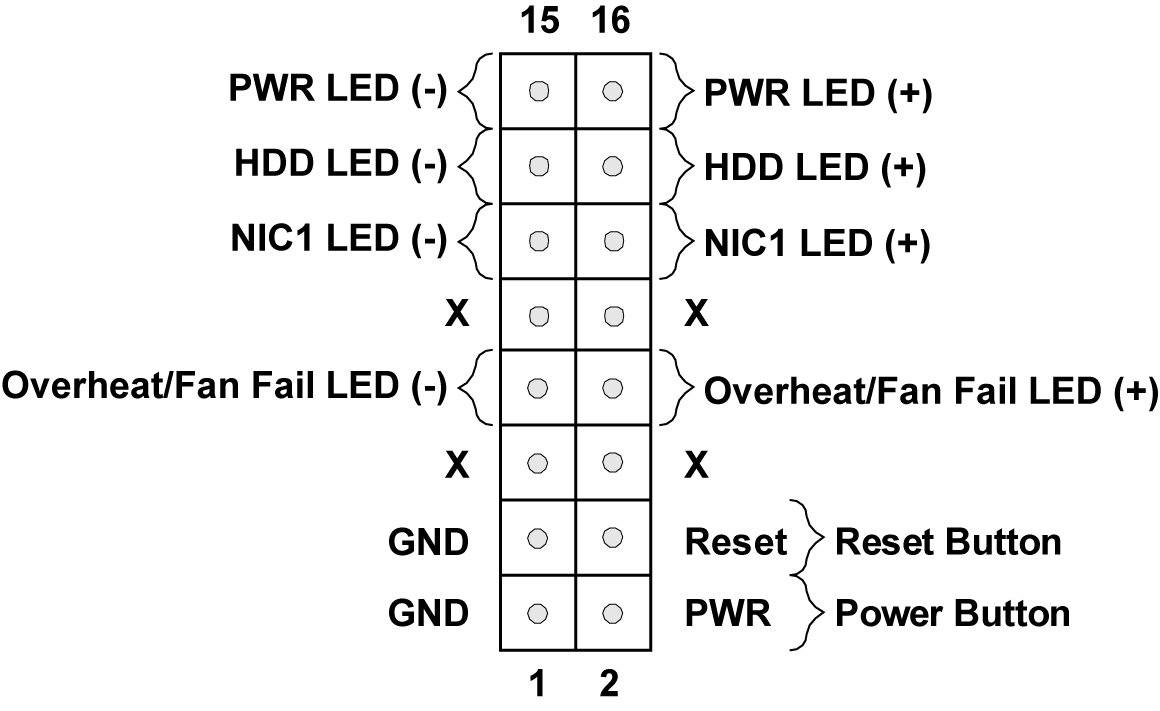
Figure 40. Front Control Panel Pin Definitions
For a detailed diagram of the C9Z890-MW/C9B860-MW/C9Q870-M motherboard, see the layout under Quick Reference.