LLDP
LLDP Overview
LLDP is a neighbor discovery protocol that is used for network devices to advertise information about themselves to other devices on the network. This protocol runs over the data-link layer, which allows two systems running different network layer protocols to learn about each other.
Devices in a LAN maintain operations-related configuration information in management information bases (MIBs). LLDP helps avoid misconfiguration problems in LANs by enabling LAN devices to be aware of other devices' configuration information.
LLDP supports a set of attributes that it uses to discover neighbor devices. These attributes contain type, length, and value descriptions and are referred to as TLVs. LLDP supported devices can use TLVs to receive and send information to their neighbors. Details such as configuration information, device capabilities, and device identity can be advertised using LLDP.
LLDP Configuration
Default Configuration
|
Parameter |
Default Value |
|---|---|
|
LLDP Status |
Enabled |
|
LLDP PDU Interval |
30 secs |
Disable LLDP
There is no SONiC command to disable LLDP. However, LLDP can be disabled using the commands below.
|
Step |
Command |
Description |
|---|---|---|
|
1 |
systemctl disable lldp |
Disable LLDP. |
|
2 |
show lldp table |
Display the LLDP neighbors in tabular format. |
|
3 |
show lldp neighbors |
Display the LLDP neighbors. |
The following example shows how to disable LLDP.
|
admin@sonic: ~$ sudo systemctl disable lldp |
||||
|
Removed /etc/systemd/system/sonic.target.wants/lldp.service. |
||||
|
admin@sonic: ~$ show lldp table |
||||
|
Capability codes: (R) Router, (B) Bridge, (O) Other |
||||
|
LocalPort |
RemoteDevice |
RemotePortID |
Capability |
RemotePortDescr |
|
- - - |
- - - |
- - - |
- - - |
- - - |
|
- - - |
- - - |
- - - |
- - - |
- - - |
|
Total entries displayed: 1 |
||||
|
admin@sonic: ~$ show lldp neighbors |
||||
|
- - - |
- - - |
|
|
|
|
LLDP Neighbors: |
||||
|
- - - |
- - - |
|
|
|
|
Interface: |
Ethernet0, via: LLDP, RID: 3, Time: 0 day, 00:03:33 |
|||
|
Chassis: |
|
|
|
|
|
|
Chasid: mac 0c:c4:7a:f7:d0:d5 |
|||
|
Port: |
|
|
|
|
|
|
PortID: ifalias Gi0/41 |
|||
|
|
TTL: 120 |
|||
|
- - - |
- - - |
|
|
|
Enable LLDP
LLDP is enabled by default in SONiC switches. There is no specific SONiC command to enable it. However, LLDP can be enabled by using the commands below.
|
Step |
Command |
Description |
|---|---|---|
|
1 |
systemctl enable lldp |
Enable LLDP. |
|
2 |
show lldp table |
Display the LLDP neighbors in tabular format. |
|
3 |
show lldp neighbors |
Display the LLDP neighbors. |
The following example shows how to enable LLDP.
|
admin@sonic: ~$ sudo systemctl enable lldp |
||||
|
admin@sonic: ~$ show lldp table |
||||
|
Capability codes: (R) Router, (B) Bridge, (O) Other |
||||
|
LocalPort |
RemoteDevice |
RemotePortID |
Capability |
RemotePortDescr |
|
- - - |
- - - |
- - - |
- - - |
- - - |
|
Ethernet0 |
|
Gi0/41 |
|
|
|
- - - |
- - - |
- - - |
- - - |
- - - |
|
Total entries displayed: 1 |
||||
|
admin@sonic: ~$ show lldp neighbors |
||||
|
- - - |
- - - |
|
|
|
|
LLDP Neighbors: |
||||
|
- - - |
- - - |
|
|
|
|
Interface: |
Ethernet0, via: LLDP, RID: 3, Time: 0 day, 00:05:03 |
|||
|
Chassis: |
|
|
|
|
|
|
ChassisID: mac 0c:c4:7a:f7:d0:d5 |
|||
|
Port: |
|
|
|
|
|
|
PortID: ifalias Gi0/41 |
|||
|
|
TTL: 120 |
|||
|
- - - |
- - - |
|
|
|
Start LLDP Service
The LLDP service can be started using the commands below.
|
Step |
Command |
Description |
|---|---|---|
|
1 |
systemctl start lldp |
Start the LLDP service. |
|
2 |
show lldp table |
Display the LLDP neighbors in tabular format. |
|
3 |
show lldp neighbors |
Display the LLDP neighbors. |
The following example shows how to start the LLDP service.
|
admin@sonic: ~$ sudo systemctl start lldp |
||||
|
admin@sonic: ~$ show lldp table |
||||
|
Capability codes: (R) Router, (B) Bridge, (O) Other |
||||
|
LocalPort |
RemoteDevice |
RemotePortID |
Capability |
RemotePortDescr |
|
- - - |
- - - |
- - - |
- - - |
- - - |
|
Ethernet0 |
|
Gi0/41 |
|
|
|
- - - |
- - - |
- - - |
- - - |
- - - |
|
Total entries displayed: 1 |
||||
|
admin@sonic: ~$ show lldp neighbors |
||||
|
- - - |
- - - |
|
|
|
|
LLDP Neighbors: |
||||
|
- - - |
- - - |
|
|
|
|
Interface: |
Ethernet0, via: LLDP, RID: 3, Time: 0 day, 00:08:32 |
|||
|
Chassis: |
|
|
|
|
|
|
ChassisID: mac 0c:c4:7a:f7:d0:d5 |
|||
|
Port: |
|
|
|
|
|
|
PortID: ifalias Gi0/41 |
|||
|
|
TTL: 120 |
|||
|
- - - |
- - - |
|
|
|
Stop LLDP Service
The LLDP service can be stopped using the commands below.
|
Step |
Command |
Description |
|---|---|---|
|
1 |
systemctl stop lldp |
Stop the LLDP service. |
|
2 |
show lldp table |
Display the LLDP neighbors in tabular format. |
|
3 |
show lldp neighbors |
Display the LLDP neighbors. |
The following example shows how to stop the LLDP service.
|
admin@sonic: ~$ sudo systemctl stop lldp |
|
admin@sonic: ~$ show lldp table |
|
Error response from daemon: Container 852441f50ba91588ab5d4e1803feb583c0c9bb6d31c11e73bc4c18a9b9578ede is not running |
|
|
|
admin@sonic: ~$ show lldp neighbors |
|
Error response from daemon: Container 852441f50ba91588ab5d4e1803feb583c0c9bb6d31c11e73bc4c18a9b9578ede is not running |
LLDP Configuration Example
The figure and examples below show a configuration in the LLDP-enabled SONiC switches connected by a port in between.
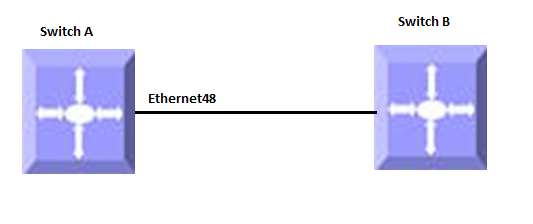
Figure 6. LLDP Configuration Example
-
Stop the LLDP service:
admin@sonic: ~$ sudo systemctl stop lldp
admin@sonic: ~$ show lldp table
Error response from daemon: Container 852441f50ba91588ab5d4e1803feb583c0c9bb6d31c11e73bc4c18a9b9578ede is not running
admin@sonic: ~$ show lldp neighbors
Error response from daemon: Container 852441f50ba91588ab5d4e1803feb583c0c9bb6d31c11e73bc4c18a9b9578ede is not running
-
Start the LLDP service:
admin@sonic: ~$ sudo systemctl start lldp
admin@sonic: ~$ show lldp table
Capability codes: (R) Router, (B) Bridge, (O) Other
LocalPort
RemoteDevice
RemotePortID
Capability
RemotePortDescr
- - -
- - -
- - -
- - -
- - -
Ethernet0
Gi0/41
- - -
- - -
- - -
- - -
- - -
Total entries displayed: 1
admin@sonic: ~$ show lldp neighbors
- - -
- - -
LLDP Neighbors:
- - -
- - -
Interface:
Ethernet0, via: LLDP, RID: 1, Time: 0 day, 00:00:21
Chassis:
ChassisID: mac 0c:c4:7a:f7:d0:d5
Port:
PortID: ifalias Gi0/41
TTL: 120
- - -
- - -
Note: After starting the LLDP service, the switch would take a few seconds to exchange LLDP packets with its neighbor and show the neighbors in the LLDP neighbor table.