Control Panel
The following switches and LEDs are located on the SYS-112B-WR server control panel.
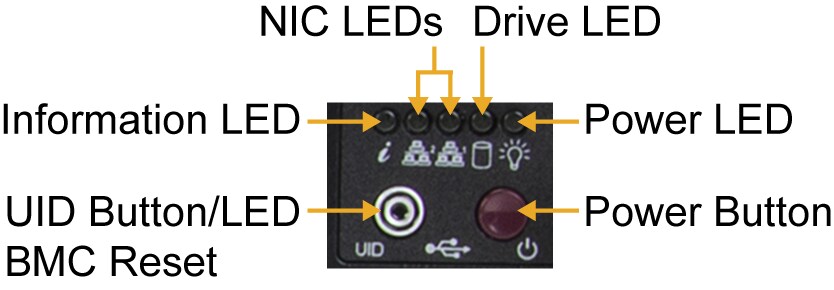
Figure 2. Control Panel
|
Control Panel |
|
|---|---|
|
Feature |
Description |
|
UID/LED Button |
Push this button to turn on the blue UID LED indicators both at the front and at the rear. This helps in identifying the unit when part of a large installation. The BMC can be reset using the UID switch. |
|
Information LED |
Alerts operator to several states, as noted in the table below. |
|
NIC1/2 LEDs |
Indicates network activity on the LANs when flashing. |
|
Drive LED |
Indicates activity on the storage drives when flashing. |
|
Power LED |
Steady on: power on Blinking at 4 Hz: checking BIOS/BMC integrity Blinking at 4 Hz and "i" LED is blue: BIOS firmware updating Two blinks at 4 Hz, one pause 2 Hz, and "i" LED blue: BMC firmware updating Blinking at 1 Hz and "i" LED red: fault detected |
|
Power Button |
The main power switch applies or removes primary power from the power supply to the server but maintains standby power. Hold for four seconds to force a shut-down. |
|
Information LED |
|
|---|---|
|
Color, Status |
Description |
|
Red, solid |
An overheat condition has occurred. |
|
Red, blinking at 1 Hz |
Fan failure; check for an inoperative fan. |
|
Red, blinking at 0.25 Hz |
Power failure; check for an inoperative power supply. |
|
Red, solid with Power LED blinking green |
Fault detected. |
|
Blue and red, blinking at 10 Hz |
Recovery mode. |
|
Blue, solid |
UID has been activated locally to locate the server in a rack environment. |
|
Blue, blinking at 1 Hz |
UID has been activated via BMC to locate the server in a rack environment. |
|
Blue, blinking at 2 Hz |
BMC is resetting. |
|
Blue, blinking at 4 Hz |
BMC is setting factory defaults. |
|
Blue, blinking at 10 Hz with Power LED blinking green |
BMC/BIOS firmware is updating. |