Question
I tried updating BIOS for motherboard X9DBL-IF but did not succeed. I followed the manual which asks me to update the IPMI firmware to 2.0 or above and then the BIOS. There is an error message popped up "-Error: Problem allocating memory"
Print
Answer
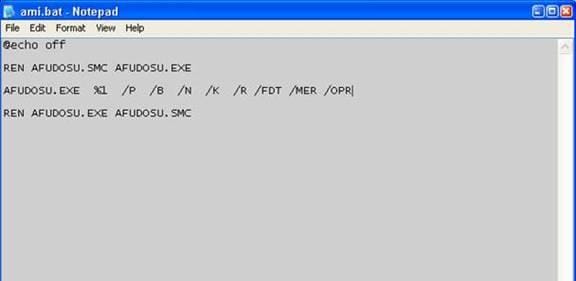
Temporary solution: edit and modify the AMI.BAT same as the picture below then save and run the BIOS update again.
Was this FAQ helpful?
Enter Comments Below:
Note: Your comments/feedback should be limited to this FAQ only. For technical support, please send an email to .
Enter your email address below if you'd like technical support staff to reply:
Please type the Captcha (no space)
V 4 N E
Find more questions
Still Need Support?
Having trouble finding what you're searching for? Contact our support team for further assistance.

Certain products may not be available in your region
