If you’re A+ system with H11 MB BMC version is BMC v1.52.18 (or later version) with Naples CPU (EPYC 7xx1). You can update BIOS to v2.6a through SUM OOB or JAVA plug-in.
If you use BMC webGUI to update BIOS, you may encounter hang at POST code 00 issue. When the system/MB hang at POST code 00 after update BIOS. Please AC off/on the system/MB, the issue will be resolved.
Please download SUM from Supermicro website:
Please follow below steps to update BIOS via SUM OOB.
SUM OOB:
1. Download SUM and unzip the SUM.zip file.
2. Put BIOS bin file to the sum folder.
3. Open terminal, enter below command:
./sum -i <IP or host name> -u <username> -p <password> -c UpdateBios --file <filename> [options…]
4. OOB Example:
./sum -i 192.168.34.56 -u ADMIN -p PASSWORD -c UpdateBios --file Supermicro_BIOS.bin --reboot
5. AC on/off the system/MB.
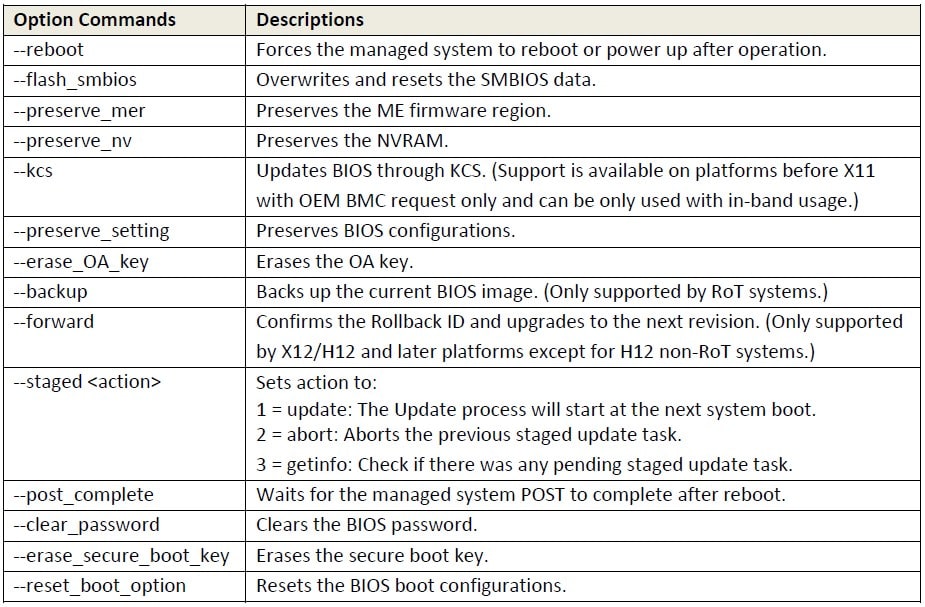
There are some option commands. You can refer to UserGuide P.219.
(Ex: if you would like to preserve your BIOS setting, you can add ”--preserve_setting” to the command.)
JAVA plug-in:
1. Download BIOS package from product webpage, unzip the file to a USB flash(format: FAT/FAT32).
2. Open JAVA plug-in and mount the USB.(Virtual Media -> Virtual Storage)
3. Boot the system/MB to EFI shell -> USB flash, enter below command:
flash.nsh <filename>
4. In-Band Example:
flash.nsh BIOS_H11DSU-0963_20xxxxx.bin
5. Use command “reset” or “CTRL+ALT+DEL” to reboot the system/MB.
If you would like to preserve BIOS settings, please dump the BIOS setting before update and restore it after update.


 Print
Print
 Share
Share