Does H13 MB/system support AMD EPYC 9005 series processor? I install AMD EPYC 9005 series processor on my H13 MB/system. When I power on, fan is active but no display.
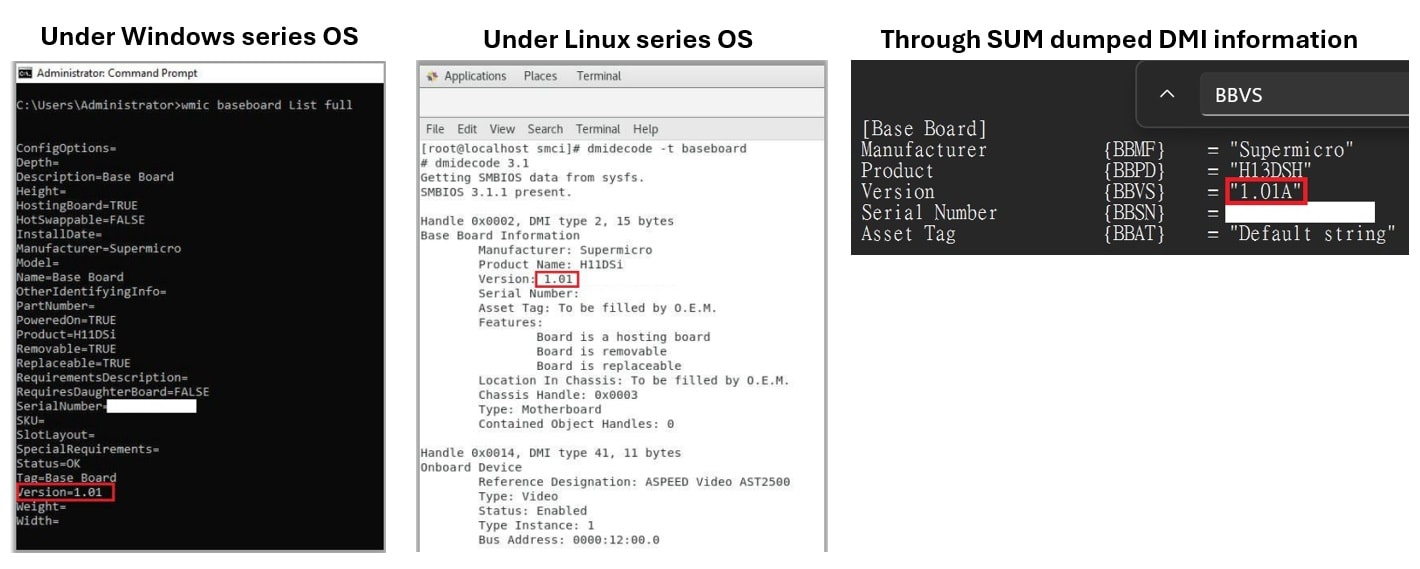
2. If you are not able to physically check motherboard revision, you can refer to below steps to guide you to identify motherboard revision:
Under Windows series OS
You can use WMIC command “C:\>wmic baseboard list full” to output base board revision information. (please refer to below screenshot)
Under Linux series OS
You can use dmidecode utility “# su dmidecode –t baseboard” to output base board revision information. (please refer to below screenshot)
Through OOB way
You can use SUM with below command to save the DMI information as a txt file. Then search “BBVS” in DMI.txt to find the MB revision (please refer to below screenshot)
(Please note that, OOB license is required for SUM utility. Active OOB license before running below command)
3. If you still don’t know how to identify, please submit your product SN to our technical support department for further checking. Supermicro technical support contact:


 Print
Print
 Share
Share