Root Cause:
The Linux kernel enumerates NVMe devices sequentially as /dev/nvme<x>n<y> based on PCIe detection timing during boot. This order is not persistent and may vary across reboots. In contrast, the BMC orders NVMe drive according to their physical PCIe slot, which remains consistent across reboots.
Best Practice:
Always use the NVMe drive’s UUID for identification and mounting. This provides stable and reliable operation independent of kernel enumeration order.
Steps to Map OS Device Names to BMC Slot Order:
The NVMe slot number is consistent between Linux and the BMC, allowing it to be used to map the same drive across both sides.
In Linux, follow these essential steps:
1.Identify the NVMe device name (e.g. nvme0n1, nvme1n1, ...).
2.Determine the physical slot number (e.g., Slot 1, Slot 2, ...) for a given NVMe device.
3.[Optional] Extract the UUID, serial number and model name of the NVMe drive.
Below is a sample Bash script for performing these steps:
#!/bin/bash
# NVMe Mapping Script: PCI Address, Namespace, Slot, Serial, UUID, and Model
# Adjusted column widths for readability
printf "%-18s %-10s %-6s %-20s %-38s %s\n" "PCI Address" "Namespace" "Slot" "Serial" "UUID" "Model"
printf "%s\n" "------------------------------------------------------------------------------------------------------------------------------------------------------"
for pci in $(lspci -D | awk '/Non-Volatile memory controller/{print $1}'); do
#1 Identify the Controller (e.g., nvme0)
ctrl=$(ls "/sys/bus/pci/devices/$pci/nvme" 2>/dev/null | head -n1)
#2 Identify the Namespace (e.g., nvme0n1)
nvme_ns=$(ls "/sys/bus/pci/devices/$pci/nvme/$ctrl" 2>/dev/null | grep -o 'nvme[0-9]\+n[0-9]\+' | head -n1)
#3 Hardware Identifiers (Controller Level)
serial=$( [ -n "$ctrl" ] && cat "/sys/class/nvme/$ctrl/serial" 2>/dev/null | xargs || echo "N/A")
model=$( [ -n "$ctrl" ] && cat "/sys/class/nvme/$ctrl/model" 2>/dev/null | xargs || echo "N/A")
#4 Universal Unique Identifier (Block Level)
uuid=$( [ -n "$nvme_ns" ] && cat "/sys/block/$nvme_ns/uuid" 2>/dev/null || echo "N/A")
#5 Physical Slot
slot=$(cat "/sys/bus/pci/devices/$pci/slot" 2>/dev/null || \
sudo lspci -vvs "$pci" 2>/dev/null | grep -oP 'Physical Slot: \K.*' || echo "N/A")
printf "%-18s %-10s %-6s %-20s %-38s %s\n" "$pci" "${nvme_ns:-N/A}" "$slot" "$serial" "$uuid" "$model"
done
Example Output for the Script:
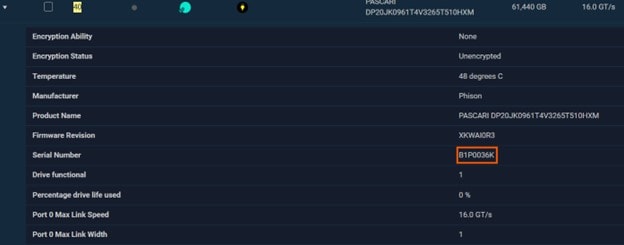
Cross-referencing the NVMe drive information in the BMC WebGUI confirms that the details are identical to those in the OS.



 Print
Print
 Share
Share